 DJ Mix Studio
DJ mixes you never
have to re-record.
Arrange your tracks, pick a transition, export an MP3. If a blend doesn't sit right, fix it later — as many times as you like. Runs entirely in your browser, and your audio never leaves your machine. Free.
Built for: DJs who deliver a monthly podcast or radio mix, send out demo mixes, or publish a studio version of last night's set. If your library lives in rekordbox, your BPMs and keys carry straight over. The app interface is currently in Japanese — an English UI is on the roadmap.
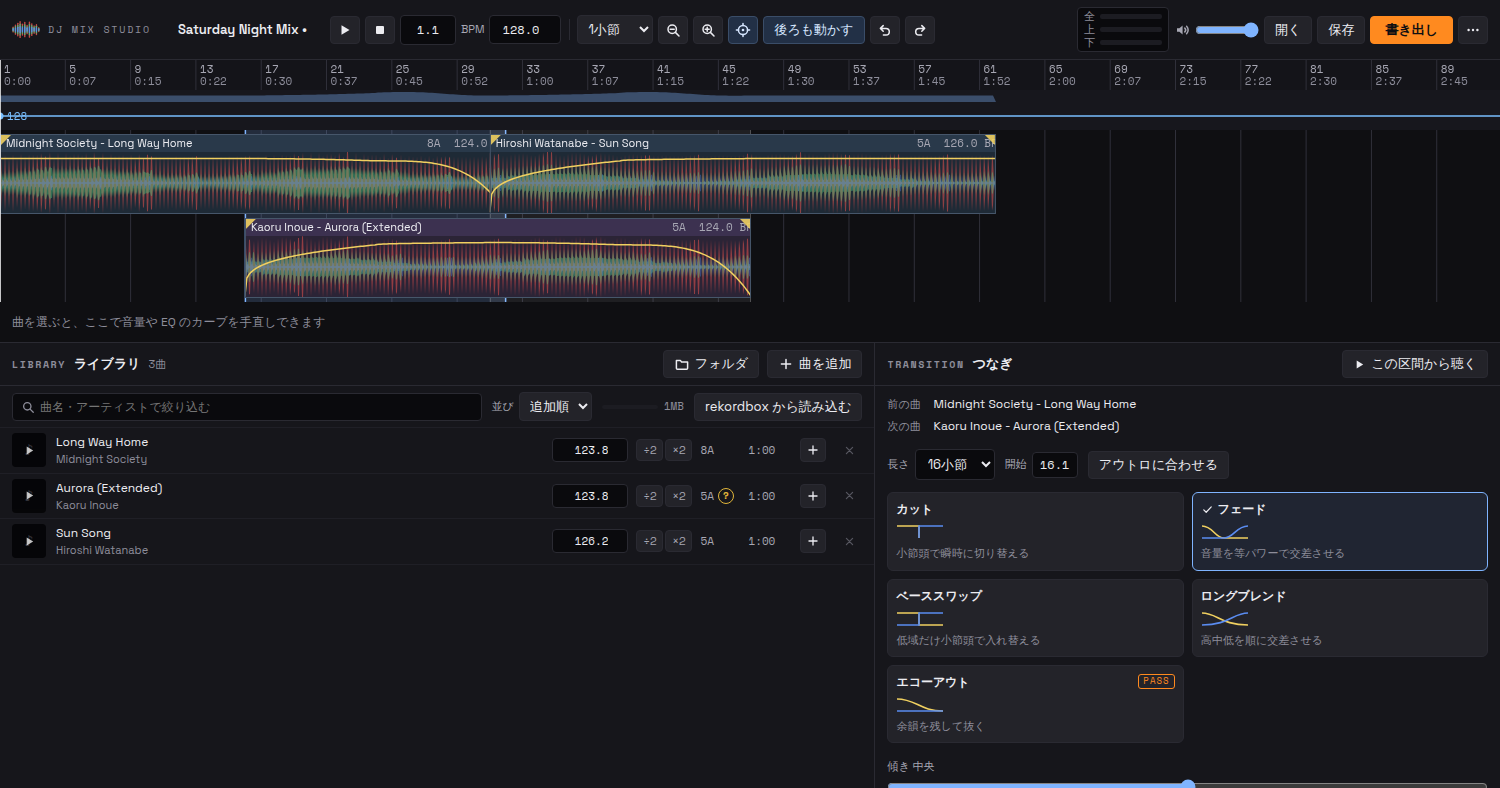
The actual app. Tracks alternate between the upper and lower lane; click an overlap to choose how they blend.
Hear the transitions first
The same two tracks, blended four ways. Press a button: the second track comes in at bar 8 and the switch lands on a downbeat (about 14 seconds).
These are synthesized sounds (we can't bundle real records). In the app you try the same transitions on your own tracks.
Three steps, nothing else
-
01 / IMPORT
Drop in your tracks
Drag files in and the app analyzes BPM, key, waveform, intro and outro on your machine. Load a rekordbox XML and it uses those values as they are.
-
02 / ARRANGE
Arrange, then pick a transition
Tracks snap to the beat and get a fade the moment you place them. Click an overlap to switch to a cut, a bass swap or a long blend.
-
03 / EXPORT
Export
MP3 or WAV, with a timestamped tracklist and a CUE sheet. An hour-long mix goes through fine. Straight on to Mixcloud or SoundCloud.
What it does
- rekordbox import — uses your collection's BPM, key and grid as they are. Matches by title if the filename differs
- Ripple editing — insert, delete or stretch a track and everything after it moves along. No gaps left behind
- Key lock — change the tempo and the pitch stays put. Key shift of ±6 semitones
- Auto gain — evens out level differences between tracks the moment you place them
- Fix it later — volume, EQ and filter curves can be reshaped at any time
- Double-check marks — flags half/double tempo and uncertain keys, with ÷2 / ×2 fixes one click away
- Save and resume — your work is saved automatically and picks up where you left off
- Hour-long mixes — sliced rendering exports long mixes without eating memory
Formats: MP3 / AAC / WAV / FLAC. Chrome and Edge recommended. In Safari and Firefox every save becomes a download.
The core stays free. Pay once for the finishing touches
Arranging, shaping transitions and exporting stay free, for good. Studio Pass bundles the finishing tools for publishing, and that is what funds development.
Free
- Import and analysis, rekordbox import
- Arranging and transitions (cut / fade / bass swap / long blend)
- Volume, EQ and filter editing, key lock
- MP3 / WAV export, tracklist and CUE sheet
- Autosave, offline launch
Studio Pass Pro finishing
- Loudness normalization — export at the streaming standard (−14 LUFS)
- Echo out — cut the track and leave only its tail
- Suggested order — arranges selected tracks by key compatibility and tempo
- Save with audio — bundle the audio into the .djmix and open it on another machine
- Future finishing tools included, no extra charge
The checkout page is being set up and will appear here. After purchase you receive a key; paste it into "Studio Pass" in the app to activate. No audio or personal data is ever sent.
Questions
Which browsers work?
Chrome and Edge on a desktop are recommended. Safari and Firefox run it too, but "Save" becomes a download every time and cannot overwrite the same file, and imported tracks may not persist between sessions.
Does it work on a phone or tablet?
No. Arranging tracks and shaping transitions needs a wide screen and a mouse. Send this page's URL to your desktop and open it there.
Can I use Spotify or Apple Music tracks?
No. Streaming audio is encrypted and the terms of service don't allow it. It works with MP3 / AAC / WAV / FLAC files you own.
Is my audio uploaded anywhere?
No. Analysis, playback and export all happen inside the browser; the server only delivers the app itself. A Content Security Policy blocks outbound requests at the browser level, so it can't happen by accident either.
Where are imported tracks stored, and how do I delete them?
In the browser's private storage (OPFS): the original file plus its analysis. The × on each library row deletes the stored copy too. Usage is shown at the top of the library.
What if the BPM or key is wrong?
Tempos prone to half/double detection and uncertain keys get a "?" mark. Fix them with ÷2 / ×2 or by typing the value; tracks already on the timeline update too. If you load rekordbox data, those values take priority.
How does the Studio Pass key work?
Paste the string starting with DJMS- into "Studio Pass" in the app's top-right menu and press activate. The key is stored in that browser and verified on your machine (no network call). The same key works on your other devices.
Is there a desktop version?
Experimental macOS / Linux builds are on GitHub Releases. They are unsigned, so the OS warns on first launch. Start with the browser version — install it and it lives in your dock as a standalone app.